


Bonus Tutorial: Writing Your Own Training Loop (Bonus)#
Week 2, Day 2: ConvNets
By Neuromatch Academy
Content creators: Dawn Estes McKnight, Richard Gerum, Cassidy Pirlot, Rohan Saha, Liam Peet-Pare, Saeed Najafi, Alona Fyshe
Content reviewers: Saeed Salehi, Lily Cheng, Yu-Fang Yang, Polina Turishcheva, Bettina Hein, Kelson Shilling-Scrivo, Jiaxin Cindy Tu
Content editors: Gagana B, Nina Kudryashova, Anmol Gupta, Xiaoxiong Lin, Spiros Chavlis, Jiaxin Cindy Tu
Production editors: Alex Tran-Van-Minh, Gagana B, Spiros Chavlis, Konstantine Tsafatinos
Based on material from: Konrad Kording, Hmrishav Bandyopadhyay, Rahul Shekhar, Tejas Srivastava
Tutorial Objectives#
At the end of this tutorial, you will be able to:
Train a CNN by writing your own training loop
Recognize the symptoms of overfitting and how to combat them
Setup#
Install and import feedback gadget#
Show code cell source
# @title Install and import feedback gadget

!pip3 install vibecheck datatops --quiet

from vibecheck import DatatopsContentReviewContainer
def content_review(notebook_section: str):
    return DatatopsContentReviewContainer(
        "",  # No text prompt
        notebook_section,
        {
            "url": "https://pmyvdlilci.execute-api.us-east-1.amazonaws.com/klab",
            "name": "neuromatch_dl",
            "user_key": "f379rz8y",
        },
    ).render()


feedback_prefix = "W2D2_T2"
# Imports
import random
import time
import torch
import scipy.signal
import numpy as np
import matplotlib.pyplot as plt

import torch.nn as nn
import torch.nn.functional as F

import torchvision.transforms as transforms
import torchvision.datasets as datasets
from torch.utils.data import DataLoader

from tqdm.notebook import tqdm, trange
from PIL import Image

import os
import requests
import torchvision
from torchvision.datasets import ImageFolder
Figure Settings#
Show code cell source
# @title Figure Settings
import logging
logging.getLogger('matplotlib.font_manager').disabled = True

import ipywidgets as widgets  # Interactive display
%matplotlib inline
%config InlineBackend.figure_format = 'retina'
plt.style.use("https://raw.githubusercontent.com/NeuromatchAcademy/content-creation/main/nma.mplstyle")
Helper functions#
Show code cell source
# @title Helper functions
from scipy.signal import correlate2d
import zipfile, gzip, shutil, tarfile


def download_data(fname, folder, url, tar):
  """
  Data downloading from OSF.

  Args:
    fname : str
      The name of the archive
    folder : str
      The name of the destination folder
    url : str
      The download url
    tar : boolean
      `tar=True` the archive is `fname`.tar.gz, `tar=False` is `fname`.zip

  Returns:
    Nothing.
  """

  if not os.path.exists(folder):
    print(f'\nDownloading {folder} dataset...')
    r = requests.get(url, allow_redirects=True)
    with open(fname, 'wb') as fh:
      fh.write(r.content)
    print(f'\nDownloading {folder} completed.')

    print('\nExtracting the files...\n')
    if not tar:
      with zipfile.ZipFile(fname, 'r') as fz:
        fz.extractall()
    else:
      with tarfile.open(fname) as ft:
        ft.extractall()
    # Remove the archive
    os.remove(fname)

    # Extract all .gz files
    foldername = folder + '/raw/'
    for filename in os.listdir(foldername):
      # Remove the extension
      fname = filename.replace('.gz', '')
      # Gunzip all files
      with gzip.open(foldername + filename, 'rb') as f_in:
        with open(foldername + fname, 'wb') as f_out:
          shutil.copyfileobj(f_in, f_out)
          os.remove(foldername+filename)
  else:
    print(f'{folder} dataset has already been downloaded.\n')


def check_shape_function(func, image_shape, kernel_shape):
  """
  Helper function to check shape implementation

  Args:
    func: f.__name__
      Function name
    image_shape: tuple
      Image shape
    kernel_shape: tuple
      Kernel shape

  Returns:
    Nothing
  """
  correct_shape = correlate2d(np.random.rand(*image_shape), np.random.rand(*kernel_shape), "valid").shape
  user_shape = func(image_shape, kernel_shape)
  if correct_shape != user_shape:
    print(f"❌ Your calculated output shape is not correct.")
  else:
    print(f"✅ Output for image_shape: {image_shape} and kernel_shape: {kernel_shape}, output_shape: {user_shape}, is correct.")


def check_conv_function(func, image, kernel):
  """
  Helper function to check conv_function

  Args:
    func: f.__name__
      Function name
    image: np.ndarray
      Image matrix
    kernel_shape: np.ndarray
      Kernel matrix

  Returns:
    Nothing
  """
  solution_user = func(image, kernel)
  solution_scipy = correlate2d(image, kernel, "valid")
  result_right = (solution_user == solution_scipy).all()
  if result_right:
    print("✅ The function calculated the convolution correctly.")
  else:
    print("❌ The function did not produce the right output.")
    print("For the input matrix:")
    print(image)
    print("and the kernel:")
    print(kernel)
    print("the function returned:")
    print(solution_user)
    print("the correct output would be:")
    print(solution_scipy)


def check_pooling_net(net, device='cpu'):
  """
  Helper function to check pooling output

  Args:
    net: nn.module
      Net instance
    device: string
      GPU/CUDA if available, CPU otherwise.

  Returns:
    Nothing
  """
  x_img = emnist_train[x_img_idx][0].unsqueeze(dim=0).to(device)
  output_x = net(x_img)
  output_x = output_x.squeeze(dim=0).detach().cpu().numpy()

  right_output = [
      [0.000000, 0.000000, 0.000000, 0.000000, 0.000000, 0.000000, 0.000000,
      0.000000, 0.000000, 0.000000, 0.000000, 0.000000],
      [0.000000, 0.000000, 0.000000, 0.000000, 0.000000, 0.000000, 0.000000,
      0.000000, 0.000000, 0.000000, 0.000000, 0.000000],
      [9.309552, 1.6216984, 0.000000, 0.000000, 0.000000, 0.000000, 2.2708383,
      2.6654134, 1.2271233, 0.000000, 0.000000, 0.000000],
      [12.873457, 13.318945, 9.46229, 4.663746, 0.000000, 0.000000, 1.8889914,
      0.31068993, 0.000000, 0.000000, 0.000000, 0.000000],
      [0.000000, 8.354934, 10.378724, 16.882853, 18.499334, 4.8546696, 0.000000,
      0.000000, 0.000000, 6.29296, 5.096506, 0.000000],
      [0.000000, 0.000000, 0.31068993, 5.7074604, 9.984148, 4.12916, 8.10037,
      7.667609, 0.000000, 0.000000, 1.2780352, 0.000000],
      [0.000000, 2.436305, 3.9764223, 0.000000, 0.000000, 0.000000, 12.98801,
      17.1756, 17.531992, 11.664275, 1.5453291, 0.000000],
      [4.2691708, 2.3217516, 0.000000, 0.000000, 1.3798618, 0.05612564, 0.000000,
      0.000000, 11.218788, 16.360992, 13.980816, 8.354935],
      [1.8126211, 0.000000, 0.000000, 2.9199777, 3.9382377, 0.000000, 0.000000,
      0.000000, 0.000000, 0.000000, 6.076582, 10.035061],
      [0.000000, 0.92164516, 4.434638, 0.7816348, 0.000000, 0.000000, 0.000000,
      0.000000, 0.000000, 0.000000, 0.000000, 0.83254766],
      [0.000000, 0.000000, 0.000000, 0.000000, 0.000000, 0.000000, 0.000000,
      0.000000, 0.000000, 0.000000, 0.000000, 0.000000],
      [0.000000, 0.000000, 0.000000, 0.000000, 0.000000, 0.000000, 0.000000,
      0.000000, 0.000000, 0.000000, 0.000000, 0.000000]
  ]

  right_shape = (3, 12, 12)

  if output_x.shape != right_shape:
    print(f"❌ Your output does not have the right dimensions. Your output is {output_x.shape} the expected output is {right_shape}")
  elif (output_x[0] != right_output).all():
    print("❌ Your output is not right.")
  else:
    print("✅ Your network produced the correct output.")


# Just returns accuracy on test data
def test(model, device, data_loader):
  """
  Test function

  Args:
    net: nn.module
      Net instance
    device: string
      GPU/CUDA if available, CPU otherwise.
    data_loader: torch.loader
      Test loader

  Returns:
    acc: float
      Test accuracy
  """
  model.eval()
  correct = 0
  total = 0
  for data in data_loader:
    inputs, labels = data
    inputs = inputs.to(device).float()
    labels = labels.to(device).long()

    outputs = model(inputs)
    _, predicted = torch.max(outputs, 1)
    total += labels.size(0)
    correct += (predicted == labels).sum().item()

  acc = 100 * correct / total
  return f"{acc}%"
Plotting Functions#
Show code cell source
# @title Plotting Functions

def display_image_from_greyscale_array(matrix, title):
  """
  Display image from greyscale array

  Args:
    matrix: np.ndarray
      Image
    title: string
      Title of plot

  Returns:
    Nothing
  """
  _matrix = matrix.astype(np.uint8)
  _img = Image.fromarray(_matrix, 'L')
  plt.figure(figsize=(3, 3))
  plt.imshow(_img, cmap='gray', vmin=0, vmax=255) # Using 220 instead of 255 so the examples show up better
  plt.title(title)
  plt.axis('off')


def make_plots(original, actual_convolution, solution):
  """
  Function to build original image/obtained solution and actual convolution

  Args:
    original: np.ndarray
      Image
    actual_convolution: np.ndarray
      Expected convolution output
    solution: np.ndarray
      Obtained convolution output

  Returns:
    Nothing
  """
  display_image_from_greyscale_array(original, "Original Image")
  display_image_from_greyscale_array(actual_convolution, "Convolution result")
  display_image_from_greyscale_array(solution, "Your solution")


def plot_loss_accuracy(train_loss, train_acc,
                       validation_loss, validation_acc):
  """
  Code to plot loss and accuracy

  Args:
    train_loss: list
      Log of training loss
    validation_loss: list
      Log of validation loss
    train_acc: list
      Log of training accuracy
    validation_acc: list
      Log of validation accuracy

  Returns:
    Nothing
  """
  epochs = len(train_loss)
  fig, (ax1, ax2) = plt.subplots(1, 2)
  ax1.plot(list(range(epochs)), train_loss, label='Training Loss')
  ax1.plot(list(range(epochs)), validation_loss, label='Validation Loss')
  ax1.set_xlabel('Epochs')
  ax1.set_ylabel('Loss')
  ax1.set_title('Epoch vs Loss')
  ax1.legend()

  ax2.plot(list(range(epochs)), train_acc, label='Training Accuracy')
  ax2.plot(list(range(epochs)), validation_acc, label='Validation Accuracy')
  ax2.set_xlabel('Epochs')
  ax2.set_ylabel('Accuracy')
  ax2.set_title('Epoch vs Accuracy')
  ax2.legend()
  fig.set_size_inches(15.5, 5.5)
Set random seed#
Executing set_seed(seed=seed) you are setting the seed
Show code cell source
# @title Set random seed

# @markdown Executing `set_seed(seed=seed)` you are setting the seed

# For DL its critical to set the random seed so that students can have a
# baseline to compare their results to expected results.
# Read more here: https://pytorch.org/docs/stable/notes/randomness.html

# Call `set_seed` function in the exercises to ensure reproducibility.
def set_seed(seed=None, seed_torch=True):
  """
  Function that controls randomness.
  NumPy and random modules must be imported.

  Args:
    seed : Integer
      A non-negative integer that defines the random state. Default is `None`.
    seed_torch : Boolean
      If `True` sets the random seed for pytorch tensors, so pytorch module
      must be imported. Default is `True`.

  Returns:
    Nothing.
  """
  if seed is None:
    seed = np.random.choice(2 ** 32)
  random.seed(seed)
  np.random.seed(seed)
  if seed_torch:
    torch.manual_seed(seed)
    torch.cuda.manual_seed_all(seed)
    torch.cuda.manual_seed(seed)
    torch.backends.cudnn.benchmark = False
    torch.backends.cudnn.deterministic = True

  print(f'Random seed {seed} has been set.')


# In case that `DataLoader` is used
def seed_worker(worker_id):
  """
  DataLoader will reseed workers following randomness in
  multi-process data loading algorithm.

  Args:
    worker_id: integer
      ID of subprocess to seed. 0 means that
      the data will be loaded in the main process
      Refer: https://pytorch.org/docs/stable/data.html#data-loading-randomness for more details

  Returns:
    Nothing
  """
  worker_seed = torch.initial_seed() % 2**32
  np.random.seed(worker_seed)
  random.seed(worker_seed)
Set device (GPU or CPU). Execute set_device()#
Show code cell source
# @title Set device (GPU or CPU). Execute `set_device()`
# especially if torch modules used.

# Inform the user if the notebook uses GPU or CPU.

def set_device():
  """
  Set the device. CUDA if available, CPU otherwise

  Args:
    None

  Returns:
    Nothing
  """
  device = "cuda" if torch.cuda.is_available() else "cpu"
  if device != "cuda":
    print("WARNING: For this notebook to perform best, "
        "if possible, in the menu under `Runtime` -> "
        "`Change runtime type.`  select `GPU` ")
  else:
    print("GPU is enabled in this notebook.")

  return device
SEED = 2021
set_seed(seed=SEED)
DEVICE = set_device()
Random seed 2021 has been set.
WARNING: For this notebook to perform best, if possible, in the menu under `Runtime` -> `Change runtime type.`  select `GPU`
Section 1: Write Your Own Training Loop#
Time estimate: ~20mins
In Tutorial 1, we coded up a CNN, but trained it with some predefined functions. In this tutorial, we will walk through an example of a training loop for a convolutional net. We will train a CNN using convolution layers and maxpool and then observe what the training and validation curves look like.
Video 1: Writing your own training loop#
Submit your feedback#
Show code cell source
# @title Submit your feedback
content_review(f"{feedback_prefix}_Writing_your_own_training_loop_Bonus_Video")
Section 1.1: Understand the Dataset#
The dataset we are going to use for this task is called Fashion-MNIST. It consists of a training set of 60,000 examples and a test set of 10,000 examples. We further divide the test set into a validation set and a test set (8,000 and 2,000, respectively). Each example is a \(28 \times 28\) gray scale image, associated with a label from 10 classes. Following are the labels of the dataset:
Note: We will reduce the dataset to just the two categories T-shirt/top and Shirt to reduce the training time from about 10min to 2min. We later provide pretrained results to give you an idea how the results would look on the whole dataset.
Download Fashion MNIST dataset#
Show code cell source
# @title Download Fashion MNIST dataset

# webpage: https://github.com/zalandoresearch/fashion-mnist
fname = 'FashionMNIST.tar.gz'
folder = 'FashionMNIST'
url = "https://osf.io/dfhu5/download"
download_data(fname, folder, url, tar=True)
Downloading FashionMNIST dataset...
Downloading FashionMNIST completed.

Extracting the files...
Loading Fashion-MNIST Data#
reduce_classes(data) to reduce Fashion-MNIST Data to two-categories
Show code cell source
# @title Loading Fashion-MNIST Data

# @markdown `reduce_classes(data)` to reduce Fashion-MNIST Data to two-categories

# need to split into train, validation, test
def reduce_classes(data):
  """
  Reducing classes in Fashion MNIST
  to T-Shirts and Shirts

  Args:
    data: torch.tensor
      Training Data

  Returns:
    data: torch.tensor
      Data with two classes
  """
  # Only want T-Shirts (0) and Shirts (6) labels
  train_idx = (data.targets == 0) | (data.targets == 6)
  data.targets = data.targets[train_idx]
  data.data = data.data[train_idx]

  # Convert Xs predictions to 1, Os predictions to 0
  data.targets[data.targets == 6] = 1

  return data


def get_fashion_mnist_dataset(binary=False, download=False, seed=0):
  """
  Helper function to get Fashion MNIST data

  Args:
    binary: boolean
      If True, training data has only two classes
    download: boolean
      If True, download training data
    seed: int
      Set seed for reproducibility [default: 0]

  Returns:
    train_data: torch.tensor
      Training data
    test_data: torch.tensor
      Test data
    validation_data: torch.tensor
      Validation data
  """
  transform = transforms.Compose([
                                  transforms.ToTensor(),
                                  transforms.Normalize((0.1307,), (0.3081,))
                                  ])

  train_data = datasets.FashionMNIST(root='.',
                                     download=download,
                                     train=True,
                                     transform=transform)


  test_data = datasets.FashionMNIST(root='.',
                                    download=download,
                                    train=False,
                                    transform=transform)

  if binary:
    train_data = reduce_classes(train_data)
    test_data = reduce_classes(test_data)

  set_seed(seed)
  validation_data, test_data = torch.utils.data.random_split(test_data,
                                                             [int(0.8*len(test_data)),
                                                              int(0.2*len(test_data))])

  return train_data, validation_data, test_data
num_classes = 10
train_data, validation_data, test_data = get_fashion_mnist_dataset(seed=SEED)
Random seed 2021 has been set.
If you want to continue with the 10 class dataset, skip the next cell.
num_classes = 2
train_data, validation_data, test_data = get_fashion_mnist_dataset(binary=True, seed=SEED)
Random seed 2021 has been set.
Here’s some code to visualize the dataset.
fig, (ax1, ax2, ax3, ax4) = plt.subplots(1, 4)
ax1.imshow(train_data[0][0].reshape(28, 28), cmap=plt.get_cmap('gray'))
ax2.imshow(train_data[1][0].reshape(28, 28), cmap=plt.get_cmap('gray'))
ax3.imshow(train_data[2][0].reshape(28, 28), cmap=plt.get_cmap('gray'))
ax4.imshow(train_data[3][0].reshape(28, 28), cmap=plt.get_cmap('gray'))
fig.set_size_inches(18.5, 10.5)
plt.show()
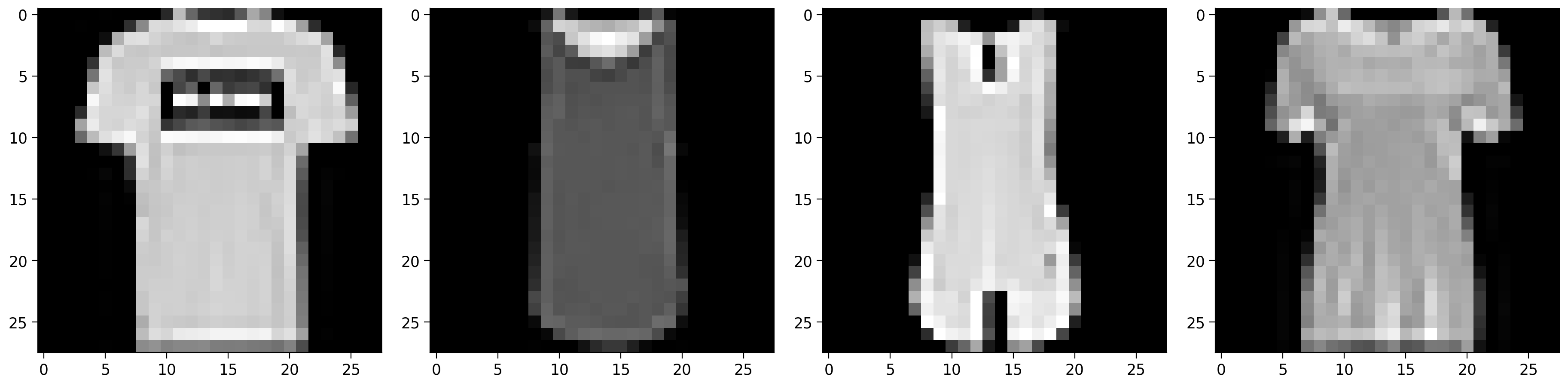
Take a minute with your pod and talk about which classes you think would be most confusable. How hard will it be to differentiate t-shirt/tops from shirts?
Video 2: The Training Loop#
Submit your feedback#
Show code cell source
# @title Submit your feedback
content_review(f"{feedback_prefix}_The_training_loop_Bonus_Video")
Section 1.2: Backpropagation Reminder#
Feel free to skip if you’ve got a good handle on Backpropagation
We know that we multiply the input data/tensors with weight matrices to obtain some output. Initially, we don’t know what the actual weight matrices are so we initialize them with some random values. These random weight matrices when applied as a transformation on the input gives us some output. At first the outputs/predictions will match the true labels only by chance.
To improve performance, we need to change the weight matrices so that the predicted outputs are similar to the true outputs (labels). We first calculate how far away the predicted outputs are to the true outputs using a loss function. Based on the loss function, we change the values of our weight matrices using the gradients of the error with respect to the weight matrices.
Since we are using PyTorch throughout the course, we will use the built-in functions to update the weights. We call the backward() method on our ‘loss’ variable to calculate the gradients/derivatives with respect to all the weight matrices and biases. And then we call the step() method on the optimizer variable to apply the gradient updates to our weight matrices.
Here’s an animation of backpropagation works.
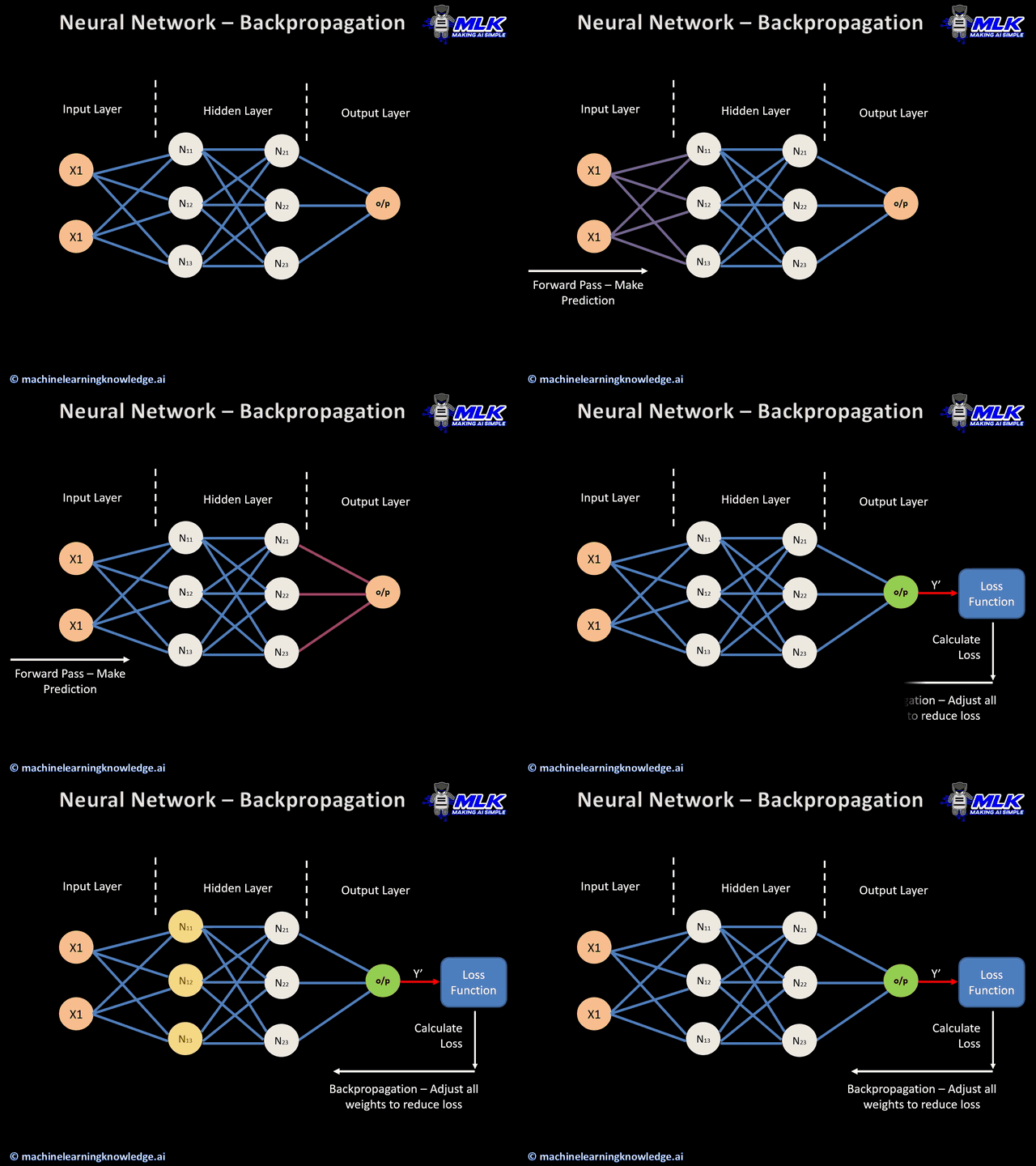
In this article you can find more animations!
Let’s first see a sample training loop. First, we create the network and load a dataset. Then we look at the training loop.
class emnist_net(nn.Module):
  """
  Create a sample network
  """

  def __init__(self):
    """
    Initialise parameters of sample network

    Args:
      None

    Returns:
      Nothing
    """
    super().__init__()
    # First define the layers.
    self.conv1 = nn.Conv2d(1, 32, kernel_size=5, padding=2)
    self.conv2 = nn.Conv2d(32, 64, kernel_size=5, padding=2)
    self.fc1 = nn.Linear(7 * 7 * 64, 256)
    self.fc2 = nn.Linear(256, 26)

  def forward(self, x):
    """
    Forward pass of sample network

    Args:
      x: torch.tensor
        Input features

    Returns:
      x: torch.tensor
        Output after passing through sample network
    """
    # Conv layer 1.
    x = self.conv1(x)
    x = F.relu(x)
    x = F.max_pool2d(x, kernel_size=2)

    # Conv layer 2.
    x = self.conv2(x)
    x = F.relu(x)
    x = F.max_pool2d(x, kernel_size=2)

    # Fully connected layer 1.
    x = x.view(-1, 7 * 7 * 64)  # You have to first flatten the ourput from the
                            # previous convolution layer.
    x = self.fc1(x)
    x = F.relu(x)

    # Fully connected layer 2.
    x = self.fc2(x)

    return x
Load a sample dataset (EMNIST)#
Show code cell source
# @title Load a sample dataset (EMNIST)
# Download the data if there are not downloaded
fname = 'EMNIST.zip'
folder = 'EMNIST'
url = "https://osf.io/xwfaj/download"
download_data(fname, folder, url, tar=False)

mnist_train = datasets.EMNIST(root=".",
                              train=True,
                              transform=transforms.ToTensor(),
                              download=False,
                              split='letters')
mnist_test = datasets.EMNIST(root=".",
                             train=False,
                             transform=transforms.ToTensor(),
                             download=False,
                             split='letters')

# Labels should start from 0
mnist_train.targets -= 1
mnist_test.targets -= 1

# Create data loaders
g_seed = torch.Generator()
g_seed.manual_seed(SEED)

train_loader = torch.utils.data.DataLoader(mnist_train, batch_size=100,
                                           shuffle=False,
                                           num_workers=2,
                                           worker_init_fn=seed_worker,
                                           generator=g_seed)
test_loader = torch.utils.data.DataLoader(mnist_test, batch_size=100,
                                          shuffle=False,
                                          num_workers=2,
                                          worker_init_fn=seed_worker,
                                          generator=g_seed)
EMNIST dataset has already been downloaded.
# Training
# Instantiate model
# Puts the Model on the GPU (Select runtime-type as GPU
#                            from the 'Runtime->Change Runtime type' option).

model = emnist_net().to(DEVICE)

# Loss and Optimizer
criterion = nn.CrossEntropyLoss()
optimizer = torch.optim.Adam(model.parameters(), lr=0.001)  # Make changes here, if necessary

# Iterate through train set minibatchs
for epoch in trange(3):  # Make changes here, if necessary
  for images, labels in tqdm(train_loader):

    # Zero out the gradients
    optimizer.zero_grad()

    # Forward pass
    x = images
    # Move the data to GPU for faster execution.
    x, labs = x.to(DEVICE), labels.to(DEVICE)
    y = model(x)

    # Calculate loss.
    loss = criterion(y, labs)

    # Backpropagation and gradient update.
    loss.backward() # Calculate gradients.
    optimizer.step() # Apply gradient udpate.


## Testing
correct = 0
total = len(mnist_test)

with torch.no_grad():
  # Iterate through test set minibatchs
  for images, labels in tqdm(test_loader):
    # Forward pass
    x = images
      # Move the data to GPU for faster execution.
    x, labs = x.to(DEVICE), labels.to(DEVICE)
    y = model(x)

    predictions = torch.argmax(y, dim=1)
    correct += torch.sum((predictions == labs).float())

print(f'Test accuracy: {correct / total * 100:.2f}%')
Test accuracy: 93.18%
You already coded the structure of a CNN. Now, you are going to implement the training loop for a CNN.
Choose the correct criterion
Code up the training part (calculating gradients, loss, stepping forward)
Keep a track of the running loss i.e for each epoch we want to to know the average loss of the batch size. We have already done the same for accuracy for you.
Section 1.3: Fashion-MNIST Dataset#
Now Let us train on the actual Fashion-MNIST dataset.
Getting the DataLoaders (Run Me)#
Show code cell source
# @markdown ##### Getting the DataLoaders (Run Me)


def get_data_loaders(train_dataset, validation_dataset,
                     test_dataset, seed,
                     batch_size=64):
  """
  Helper function to fetch dataloaders

  Args:
    train_dataset: torch.tensor
      Training data
    test_dataset: torch.tensor
      Test data
    validation_dataset: torch.tensor
      Validation data
    batch_size: int
      Batch Size  [default: 64]
    seed: int
      Set seed for reproducibility

  Returns:
    train_loader: torch.loader
      Training Data
    test_loader: torch.loader
      Test Data
    validation_loader: torch.loader
      Validation Data
  """

  g_seed = torch.Generator()
  g_seed.manual_seed(seed)

  train_loader = DataLoader(train_dataset,
                            batch_size=batch_size,
                            shuffle=True,
                            num_workers=2,
                            worker_init_fn=seed_worker,
                            generator=g_seed)
  validation_loader = DataLoader(validation_dataset,
                                 batch_size=batch_size,
                                 shuffle=True,
                                 num_workers=2,
                                 worker_init_fn=seed_worker,
                                 generator=g_seed)
  test_loader = DataLoader(test_dataset,
                           batch_size=batch_size,
                           shuffle=True,
                           num_workers=2,
                           worker_init_fn=seed_worker,
                           generator=g_seed)

  return train_loader, validation_loader, test_loader


train_loader, validation_loader, test_loader = get_data_loaders(train_data,
                                                                validation_data,
                                                                test_data, SEED)
class FMNIST_Net1(nn.Module):
  """
  Convolutional Neural Network
  """

  def __init__(self, num_classes):
    """
    Initialise parameters of CNN

    Args:
      num_classes: int
        Number of classes

    Returns:
      Nothing
    """
    super(FMNIST_Net1, self).__init__()
    self.conv1 = nn.Conv2d(1, 32, 3, 1)
    self.conv2 = nn.Conv2d(32, 64, 3, 1)
    self.fc1 = nn.Linear(9216, 128)
    self.fc2 = nn.Linear(128, num_classes)

  def forward(self, x):
    """
    Forward pass of CNN

    Args:
      x: torch.tensor
        Input features

    Returns:
      x: torch.tensor
        Output after passing through CNN
    """
    x = self.conv1(x)
    x = F.relu(x)
    x = self.conv2(x)
    x = F.relu(x)
    x = F.max_pool2d(x, 2)
    x = torch.flatten(x, 1)
    x = self.fc1(x)
    x = F.relu(x)
    x = self.fc2(x)

    return x
Coding Exercise 1: Code the Training Loop#
Now try coding the training loop.
You should first have a criterion defined (you can use CrossEntropyLoss here, which you learned about previously) so that you can calculate the loss. Next, you should to put everything together. Start the training process by first obtaining the model output, calculating the loss, and finally updating the weights.
Don’t forget to zero out the gradients.
Note: The comments in the train function provides many hints that will help you fill in the missing code. This will give you a solid understanding of the different steps involved in the training loop.
def train(model, device, train_loader, validation_loader, epochs):
  """
  Training loop

  Args:
    model: nn.module
      Neural network instance
    device: string
      GPU/CUDA if available, CPU otherwise
    epochs: int
      Number of epochs
    train_loader: torch.loader
      Training Set
    validation_loader: torch.loader
      Validation set

  Returns:
    Nothing
  """
  criterion =  nn.CrossEntropyLoss()
  optimizer = torch.optim.SGD(model.parameters(), lr=0.01, momentum=0.9)
  train_loss, validation_loss = [], []
  train_acc, validation_acc = [], []
  with tqdm(range(epochs), unit='epoch') as tepochs:
    tepochs.set_description('Training')
    for epoch in tepochs:
      model.train()
      # Keeps track of the running loss
      running_loss = 0.
      correct, total = 0, 0
      for data, target in train_loader:
        data, target = data.to(device), target.to(device)
        ####################################################################
        # Fill in missing code below (...),
        # then remove or comment the line below to test your function
        raise NotImplementedError("Update the steps of the train loop")
        ####################################################################
        # COMPLETE CODE FOR TRAINING LOOP by following these steps
        # 1. Get the model output (call the model with the data from this batch)
        output = ...

        # 2. Zero the gradients out (i.e. reset the gradient that the optimizer
        #                       has collected so far with optimizer.zero_grad())
        ...

        # 3. Get the Loss (call the loss criterion with the model's output
        #                  and the target values)
        loss = ...

        # 4. Calculate the gradients (do the pass backwards from the loss
        #                             with loss.backward())
        ...

        # 5. Update the weights (using the training step of the optimizer,
        #                        optimizer.step())
        ...

        ####################################################################
        # Fill in missing code below (...),
        # then remove or comment the line below to test your function
        raise NotImplementedError("Update the set_postfix function")
        ####################################################################
        # Set loss to whatever you end up naming your variable when
        # calling criterion
        # For example, loss = criterion(output, target)
        # then set loss = loss.item() in the set_postfix function
        tepochs.set_postfix(loss=...)
        running_loss += ...  # Add the loss for this batch

        # Get accuracy
        _, predicted = torch.max(output, 1)
        total += target.size(0)
        correct += (predicted == target).sum().item()

      ####################################################################
      # Fill in missing code below (...),
      # then remove or comment the line below to test your function
      raise NotImplementedError("Append the train_loss")
      ####################################################################
      train_loss.append(...)  # Append the loss for this epoch (running loss divided by the number of batches e.g. len(train_loader))
      train_acc.append(correct / total)

      # Evaluate on validation data
      model.eval()
      running_loss = 0.
      correct, total = 0, 0
      for data, target in validation_loader:
        data, target = data.to(device), target.to(device)
        optimizer.zero_grad()
        output = model(data)
        loss = criterion(output, target)
        tepochs.set_postfix(loss=loss.item())
        running_loss += loss.item()
        # Get accuracy
        _, predicted = torch.max(output, 1)
        total += target.size(0)
        correct += (predicted == target).sum().item()

      validation_loss.append(running_loss / len(validation_loader))
      validation_acc.append(correct / total)

  return train_loss, train_acc, validation_loss, validation_acc


set_seed(SEED)
## Uncomment to test your training loop
# net = FMNIST_Net1(num_classes=2).to(DEVICE)
# train_loss, train_acc, validation_loss, validation_acc = train(net, DEVICE, train_loader, validation_loader, 20)
# print(f'Test accuracy is: {test(net, DEVICE, test_loader)}')
# plot_loss_accuracy(train_loss, train_acc, validation_loss, validation_acc)
Random seed 2021 has been set.
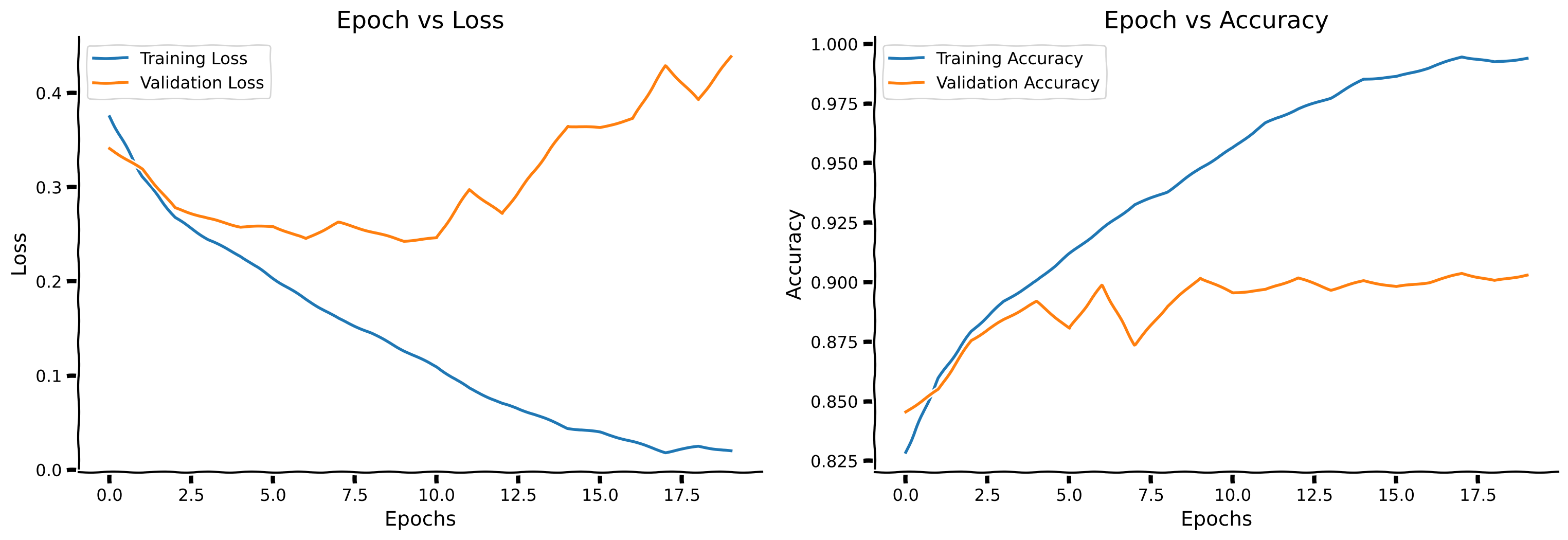
Example output:
Submit your feedback#
Show code cell source
# @title Submit your feedback
content_review(f"{feedback_prefix}_Code_the_training_loop_Bonus_Exercise")
Think! 1: Overfitting#
Do you think this network is overfitting? If yes, what can you do to combat this?
Hint: Overfitting occurs when the training accuracy greatly exceeds the validation accuracy
Submit your feedback#
Show code cell source
# @title Submit your feedback
content_review(f"{feedback_prefix}_Overfitting_Bonus_Discussion")